Case study 01 · eKYC · Face verification · Android
One registration flow for 1.33 million Anganwadi workers
Merging demographic forms, Aadhaar eKYC and face verification into one journey that a first-time smartphone user can finish on a 2 GB government phone.
- Role
- Product designer (IC)
- Organisation
- Digital India Corporation
- For
- Ministry of Women & Child Development
- Shipped
- Across 3 national launches
The two-minute version
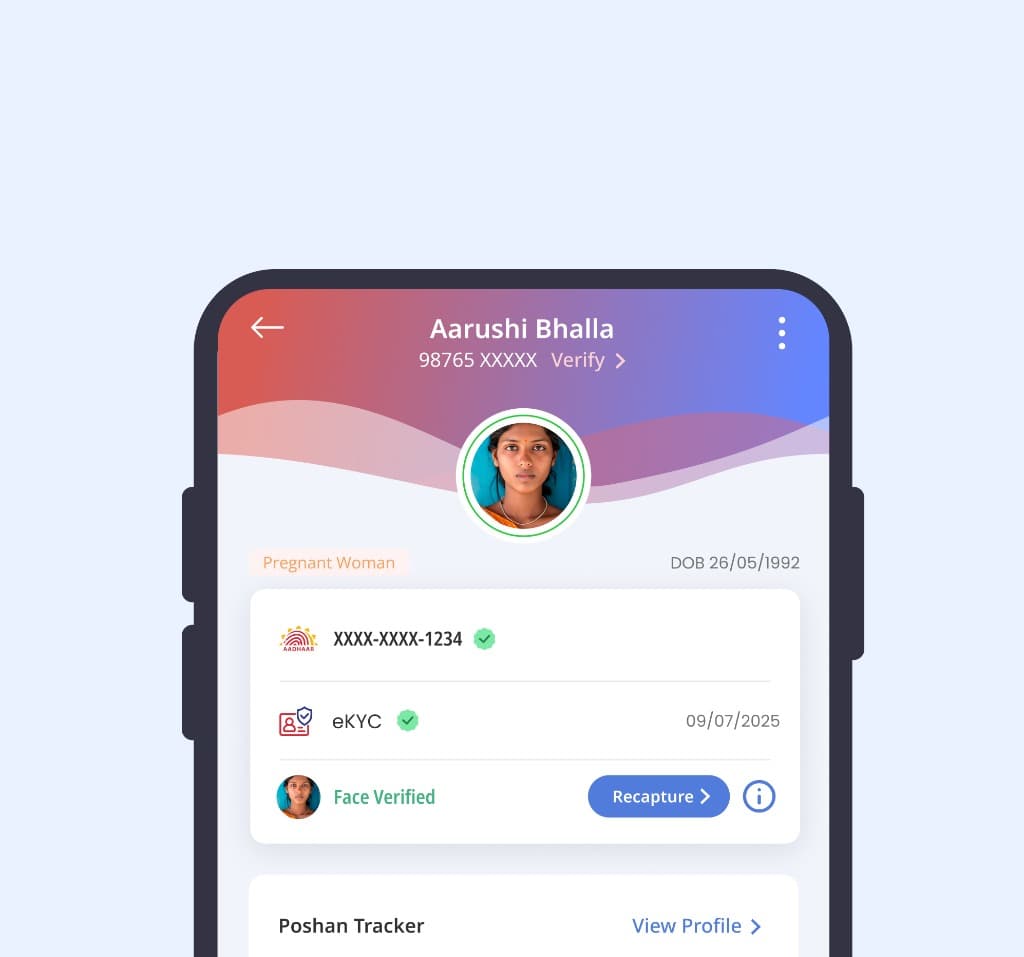
The government mandated Aadhaar eKYC and face verification for every beneficiary registration. I redesigned the flow so an Anganwadi worker with limited digital literacy, on a low-end government phone and a 2G connection, can finish it in one sitting. Three disconnected services became one four-step journey.
The problem
Poshan Tracker is the Government of India's real-time nutrition monitoring system. Beneficiaries never touch it: the Anganwadi worker registers pregnant women, mothers, children and adolescent girls on their behalf.
A new mandate required 100% of registrations to be seeded with Aadhaar eKYC and confirmed with face recognition. Demographic forms, Aadhaar APIs and the Poshan Secure face app were separate services, and the original app had been designed for urban conditions that don't exist in the field.
Constraints
- Limited digital literacy: API errors and biometric thresholds mean nothing to the user
- Real-time eKYC required by policy, so the flow must be online and synchronous
- Legacy Android Go phones with 2 GB RAM and weak front cameras
- Crowded centres, shared devices and 24 regional languages
Key decisions
- Decision 1
A four-step wizard that never loses work
Demographics, phone check, eKYC and face match became a linear wizard with saved state. If an API fails at step three, the worker keeps everything from steps one and two.
- Decision 2
Duplicate check before the heavy steps
A mobile-number lookup at step two surfaces an existing record at a neighbouring centre before any biometric call is made, saving up to ten minutes per duplicate.
- Decision 3
Plain-language errors instead of API codes
I mapped the Aadhaar error matrix and rewrote every code as an action. “Error 932: Biometric Lock” became “The beneficiary's biometric lock is on. Ask them to unlock it in the mAadhaar app.”
- Decision 4
Camera guidance that adapts to the phone
A colour-coded oval with icons replaces text instructions, giving feedback every 300 ms. Phones under 4 GB RAM get a stripped-down guide so the camera service doesn't crash.
What changed
- Faster average registration
- 30%Faster average registration
- Less manual entry, via verified eKYC auto-fill
- 70%Less manual entry, via verified eKYC auto-fill
- Saved per duplicate caught at step two
- ≤10 minSaved per duplicate caught at step two
Time and entry reductions are measured against the previous registration flow.
1.33M Anganwadi workers
89.2M Eligible beneficiaries
36 States & UTs
What I learned
Where technology fails, design the way around it
Some of the most vulnerable families had no Aadhaar card, and strict targets would have cut them off from rations. We designed a non-Aadhaar path: an enrolment ID plus another legal ID, with a 90-day grace period to finish eKYC while nutrition services continue.
Full deep-dive · shared on request
Go deeper: production screens and the full flow.
The deep-dive walks through every screen, the 7 stages of the flow and the trade-offs behind them. It uses production material, so I share it on request.